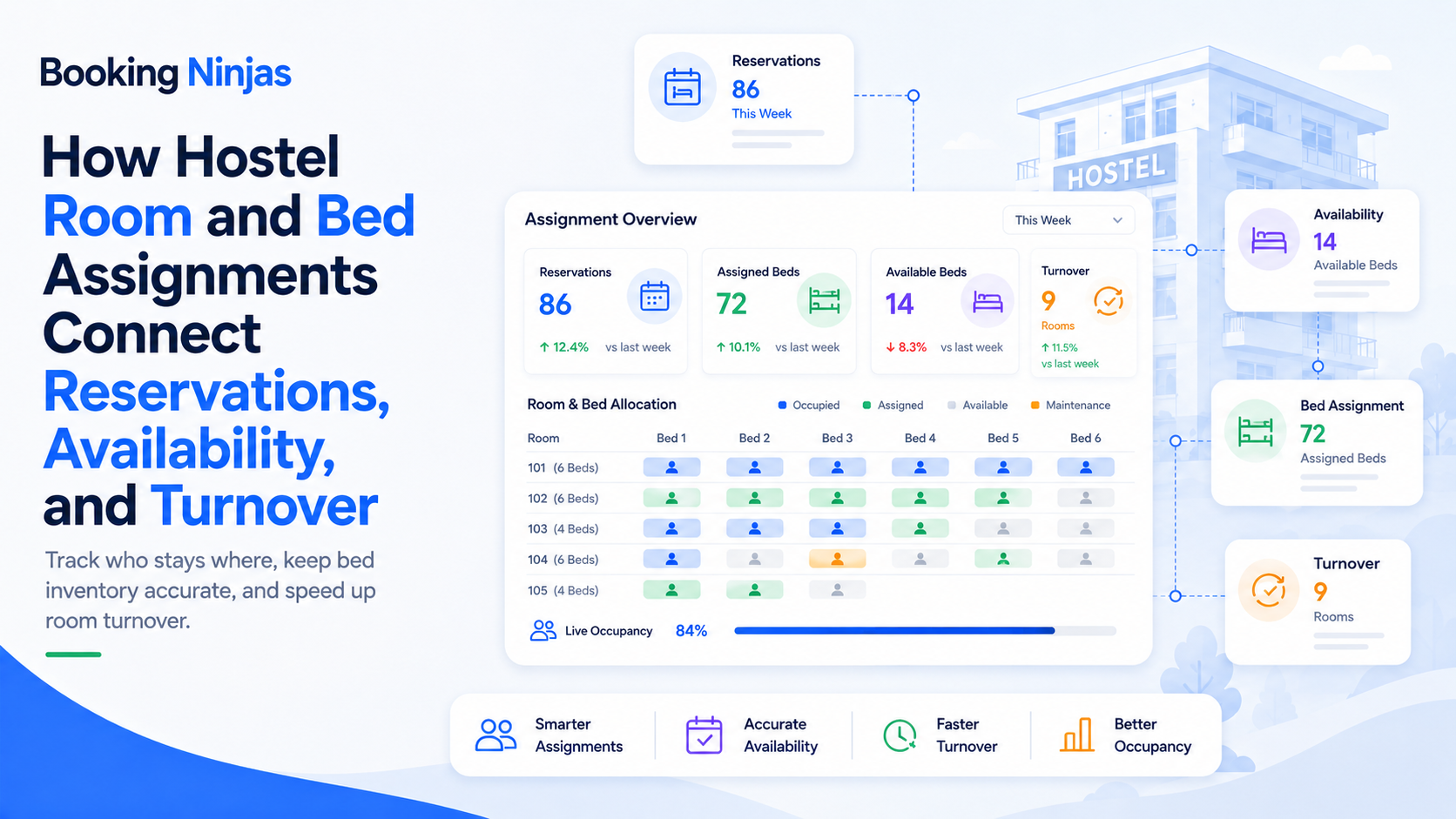
Hostel room assignment is really a bed-allocation problem. A single dorm may contain several individually sellable beds, while private rooms, group bookings, frequent check-ins, room changes, and rapid turnover create additional assignment decisions throughout the stay.
The best assignment workflow does not simply choose a bed as early as possible. It preserves enough flexibility to handle changing bookings while giving staff enough certainty to prepare rooms, coordinate housekeeping, and check guests in efficiently.
What is the difference between a reservation, availability, occupancy, and a bed assignment?
These records describe different parts of the hostel operation and should not be treated as interchangeable.
| Concept | What it answers | Example |
|---|---|---|
| Reservation | What has the guest booked? | One bed in a six-bed dorm for three nights. |
| Availability | What inventory can still be booked? | Two beds remain sellable in that dorm for the requested dates. |
| Assignment | Which physical bed or room is connected to the reservation? | Bed 4 in Dorm 203. |
| Occupancy | Which beds or spaces are actually in use now? | Five of the six dorm beds are currently occupied. |
| Readiness | Can the assigned bed or room receive the next guest? | Bed 4 is vacant but still waiting for cleaning. |
What should the hostel bed-assignment workflow look like?
The booking establishes dates, inventory type, guest, rate, and relevant requirements.
An appropriate room, dorm, or physical bed is selected according to availability and operating rules.
Staff confirm the assigned space is operationally ready before arrival or reassignment.
Departure updates occupancy and triggers the work required before the bed becomes ready again.
Why should hostels manage beds separately from rooms?
A hostel often sells individual sleeping positions inside a shared room rather than selling the room as one indivisible unit.
The inventory model may therefore need to distinguish:
- Property
- Building or floor
- Dormitory
- Private room
- Individual bed
- Room or dorm capacity
- Inventory status
- Operational restrictions
Booking Ninjas' Hostel Management supports dormitories, private rooms, individual beds, bed-level availability, assignments, guest turnover, and multi-location hostel operations.
Does a hostel need to assign the exact bed when the reservation is created?
Not always.
A hostel can reserve an eligible inventory type first and determine the exact physical bed later, depending on how its booking and operating model is configured.
Delaying final assignment can preserve flexibility when:
- Bookings are frequently modified
- Guests extend or shorten stays
- Dorm occupancy changes quickly
- Groups need to be placed together
- A bed becomes temporarily unavailable
- Housekeeping status changes
- A guest needs a room change
- Staff need to rebalance inventory
Booking Ninjas' Reservation Management manages the booking lifecycle, while the hostel operating model can connect that reservation with the specific room or bed assignment.
How should availability affect bed assignment?
A bed should only be assigned when it is compatible with the reservation dates and the hostel's applicable availability rules.
Availability can be affected by:
- Existing reservations
- Stay dates
- Dorm capacity
- Blocked inventory
- Maintenance restrictions
- Booking restrictions
- Authorized overrides
- Changes and cancellations
Booking Ninjas' Availability Management maintains real-time availability as reservations are created, modified, or canceled and supports capacity, restrictions, blackout periods, and controlled overrides.
Availability answers whether inventory can be used for the dates. Assignment adds another question: which eligible bed should be connected to this particular reservation?
Is an available bed automatically suitable for every guest?
No. Availability and suitability are different decisions.
Depending on the hostel and the information it is permitted to use, assignment may need to consider factors such as:
- Booked dorm or room type
- Capacity rules
- Group relationship
- Length of stay
- Accessible accommodation requirements
- Operational restrictions
- Approved guest requests
- Current room configuration
Some information can be a preference while other information may be a requirement. The system should preserve that distinction rather than treating every guest note as an automatic assignment rule.
How is bed assignment different from occupancy?
An assignment links a reservation to a bed or room. Occupancy describes whether that space is actually being used during the relevant period.
That distinction matters around:
- Early arrivals
- No-shows
- Late check-outs
- Room changes
- Unplanned extensions
- Temporarily blocked beds
- Walk-in reservations
- Operational overrides
Booking Ninjas' Occupancy Management provides real-time occupancy and capacity visibility that can work alongside bookings and operational workflows.
How should hostels handle bed assignments for groups?
Group accommodation adds another layer because the hostel may need to coordinate several people and multiple beds or rooms under one wider booking relationship.
A group workflow may need to distinguish:
- Group organizer
- Individual participants
- Total group size
- Reserved inventory
- Shared capacity
- Individual assignments
- Arrival differences
- Changes to individual participants
Booking Ninjas' Group Booking supports booking relationships involving multiple people, spaces, or resources, with shared capacity and allocation logic.
The exact hostel assignment process can then be configured around whether the group needs adjacent beds, an entire dorm, several rooms, or another agreed arrangement.
What should staff verify before checking a guest into an assigned bed?
The assignment should be operationally valid at the time the guest arrives.
Staff may need to confirm:
- Reservation status
- Guest identity information required by the workflow
- Assigned dorm, room, and bed
- Current occupancy
- Bed or room readiness
- Outstanding booking requirements
- Applicable payment status
- Relevant notes or approved requests
Booking Ninjas' Check-In and Check-Out connects arrival and departure events with the broader reservation and operational workflow.
How should a hostel handle a bed or room change after check-in?
A room change should update the assignment without destroying the history of the stay.
The workflow may need to record:
- Previous assignment
- New assignment
- Effective time
- Reason for the move
- Availability effect
- Occupancy effect
- Cleaning requirement
- Any related operational task
This keeps front desk, housekeeping, and management aligned while preserving a traceable reservation and occupancy history.
How should check-out and housekeeping affect the next bed assignment?
Check-out does not necessarily make the bed immediately ready for another guest.
A useful turnover workflow separates:
- Guest checked out
- Bed no longer occupied
- Cleaning required
- Cleaning assigned
- Cleaning completed
- Inspection or verification if required
- Bed marked ready
- Bed available for the next applicable use
Booking Ninjas' Housekeeping Management can connect cleaning assignments, room status, completion, and readiness with hostel turnover workflows.
The current Hostel solution also supports housekeeping tasks based on check-outs and room changes so bed availability can remain connected with actual operational readiness.
Which parts of hostel bed assignment should be automated?
Automation works best where the assignment rule is predictable and the relevant data is available.
| Process | Automation can support | Human review may be useful when |
|---|---|---|
| Availability validation | Check configured dates, capacity, restrictions, and booking conflicts. | An authorized exception or override is required. |
| Standard assignment | Apply defined allocation rules to eligible inventory. | Several equally valid choices require operational judgment. |
| Group allocation | Preserve shared capacity and group relationships. | The group has unusual placement requirements. |
| Turnover | Trigger cleaning or readiness workflows after departure. | Damage, maintenance, or another exception blocks reuse. |
| Room change | Update connected availability and occupancy records. | The reason for the move needs staff assessment. |
What changes during high-occupancy periods?
High occupancy reduces the number of alternative beds available when a reservation changes or an operational issue appears.
During these periods, staff need especially clear visibility into:
- Remaining bed availability
- Current occupancy
- Expected arrivals
- Expected departures
- Unassigned reservations
- Room and bed readiness
- Group allocations
- Blocked or restricted inventory
The objective is not to maximize occupancy at any cost. It is to understand which inventory is committed, occupied, operationally ready, and genuinely available for additional reservations.
Why do manual hostel assignment processes become difficult to maintain?
The challenge is not simply that employees must type information. The harder problem is keeping several changing records synchronized.
A manual process may require staff to separately update:
- Reservation calendar
- Bed assignment sheet
- Availability record
- Arrival list
- Occupancy list
- Housekeeping list
- Room-change notes
- Front-desk handover
As arrivals, departures, extensions, cancellations, walk-ins, and room changes accumulate, staff must reconcile those records repeatedly.
A connected hostel platform reduces the need to maintain separate interpretations of the same stay.
How should a hostel design its room and bed-assignment workflow?
- Model the physical inventory. Define properties, dorms, private rooms, individual beds, capacity, and the relationships between them.
- Define what guests actually reserve. Decide when the commercial booking is for a room, room type, dorm category, bed type, or specific physical bed.
- Define availability rules. Document dates, capacity, restrictions, blocks, maintenance conditions, and authorized overrides.
- Define assignment criteria. Separate hard requirements from preferences and determine what information staff are allowed to use.
- Choose the assignment timing. Decide when physical beds are assigned and when reassignment is permitted.
- Connect check-in and occupancy. Define what confirms that the guest actually occupies the assigned space.
- Design room-change workflows. Preserve historical assignments while updating availability, occupancy, and housekeeping requirements.
- Connect departure with turnover. Define when a bed becomes vacant, when cleaning begins, and what makes the inventory ready again.
- Test exceptions. Include no-shows, extensions, walk-ins, group changes, blocked beds, maintenance issues, and other operational disruptions.
How does Booking Ninjas connect hostel bed assignments with operations?
Booking Ninjas is a Salesforce-native platform for bookings and operations . Its Hostel Management environment supports dormitories, private rooms, individual beds, reservations, availability, dynamic bed assignment, guest turnover, housekeeping, and multi-property hostel operations.
The wider booking and operations layers allow assignment decisions to remain connected with the reservation lifecycle, availability, occupancy, check-in and check-out, group bookings, and room readiness.
Manage dorms, private rooms, individual beds, reservations, guest turnover, housekeeping, and bed-level availability.
Explore Hostel Management →Manage the reservation lifecycle, booking rules, changes, cancellations, and connected reservation history.
Explore Reservation Management →Keep inventory availability connected with reservations, changes, restrictions, capacity, and authorized overrides.
Explore Availability Management →Maintain visibility into actual use, capacity, occupancy changes, and connected operational records.
Explore Occupancy Management →Coordinate bookings involving multiple people and resources with shared capacity and allocation logic.
Explore Group Booking →Connect arrival and departure events with reservations, occupancy, assignments, and downstream operational activity.
Explore Check-In & Check-Out →Coordinate cleaning, assignment, room status, completion, and readiness around hostel turnover.
Explore Housekeeping →Frequently asked questions
What is the difference between a hostel reservation and a bed assignment?
A reservation records what accommodation the guest has booked for particular dates, while a bed assignment identifies the specific physical bed or room connected to that reservation. The exact bed does not always need to be assigned at the moment the reservation is created.
Can hostel software manage individual beds instead of only rooms?
Yes. Booking Ninjas Hostel Management supports shared dormitories, private rooms, individual beds, real-time bed availability, and assignment controls.
Is an available hostel bed automatically ready for a new guest?
Not necessarily. A bed can be unoccupied but still require cleaning, inspection, maintenance, or another operational step before it is ready for the next guest. Availability, occupancy, and readiness should therefore remain distinct statuses.
Can hostel bed assignments change after check-in?
Yes, when the operating workflow permits a change. The new assignment should remain connected to the reservation while the previous assignment, availability effect, occupancy change, and relevant housekeeping or operational activity remain traceable.
Can hostels assign several guests as part of one group booking?
Booking Ninjas Group Booking supports bookings involving multiple people, spaces, and resources with shared capacity and allocation logic. The exact hostel configuration determines how group reservations connect with individual bed or room assignments.
Should hostel bed assignments be completely automated?
Not necessarily. Automation can apply predictable availability and assignment rules, while staff review may still be appropriate for unusual group arrangements, accessibility needs, operational exceptions, room changes, or situations that require human judgment.
How does housekeeping affect hostel bed availability?
After check-out, a bed may become vacant before it becomes ready. Housekeeping and any required operational checks should update the readiness status so staff can distinguish a recently vacated bed from one that is prepared for the next guest.
Is Booking Ninjas hostel management built on Salesforce?
Yes. Booking Ninjas is Salesforce-native, allowing hostel reservations, beds, assignments, operational workflows, guest records, reporting, permissions, and automation to use the broader Salesforce platform foundation.
Connect every bed assignment to the full stay
See how Booking Ninjas can connect dorms, beds, reservations, availability, occupancy, groups, check-ins, room changes, and housekeeping in a Salesforce-native hostel environment.