
Self-Service Portal on Salesforce
Provide customers, guests, members, students, tenants, or other external users with a single place to access the Booking Ninjas information and actions you choose to expose.
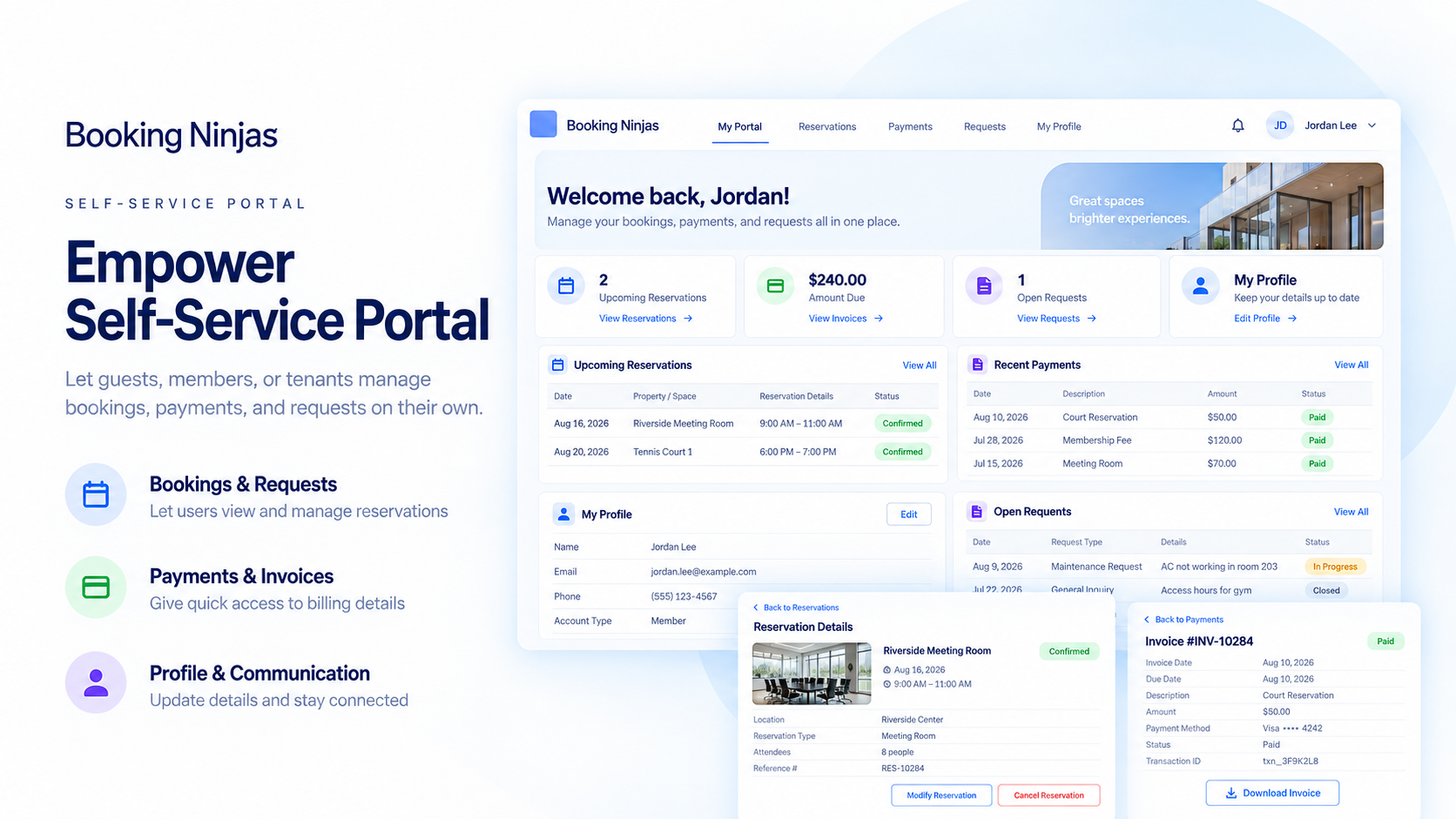
Self-Service Portal Is a Portal Extension
+£100/month per portal
Per Portal / Month
One Self-Service Portal configuration for the external-user experience.
Core + One Portal
Core is £400/month. Add one Self-Service Portal for +£100/month when Core workflows are required.
Connect the Modules You Need
Core, Membership, Class App, Event Management, Communication Hub, and other extensions remain separate where required.
Watch the Self-Service Portal in Action
Show the external-user experience, the self-service actions available, and how portal activity connects back to staff workflows.
Account & Profile
Show profile details, documents, balances, bookings, requests, and other actions available to the external user.
Bookings & Billing
Show a configured booking, invoice, balance, payment, or request workflow exposed through the portal.
Staff Handoff
Show how portal actions appear in Booking Ninjas and connect to the records staff use internally.

Verified in the Salesforce Ecosystem.
Booking Ninjas is publicly listed on Salesforce AppExchange, giving buyers an external place to review the product and its public listing details.
Give External Users the Right Self-Service Access
Expose the records and actions external users need without creating a separate operational system for staff.

Profile & Account
Allow users to view or update the account information permitted by the portal setup.
Bookings & Account Details
Surface configured bookings, reservations, services, balances, account details, or other relevant records from the modules behind the portal.
Invoices & Payments
Expose selected invoices, balances, payment history, or payment actions when the required billing setup is configured.
Bookings & Requests
Allow users to access configured reservation, booking, request, or service workflows when the underlying modules are used.
Documents & Resources
Make selected agreements, policies, confirmations, forms, and resources available to the appropriate user.
Connect Self-Service to the Work Behind It
Use the portal as the external-facing layer for bookings, billing, requests, memberships, classes, events, and other workflows powered by the appropriate Booking Ninjas modules.
Classes
Expose class enrollment or participation workflows when Class App is used.
Events
Expose event information or participation workflows when Event Management is used.
Bookings
Expose reservation or booking workflows when Core is part of the operating setup.
Requests
Allow users to submit supported requests and view relevant status information where configured.
Keep Self-Service and Communication in the Right Layers
The portal gives users a place to view information and take action. Broader email, SMS, WhatsApp, follow-up, and content drafting belong to Communication Hub.
In-Portal Information
Show selected notices, documents, status information, or next actions inside the portal experience where configured.

Communication Hub
Add Communication Hub for broader email, SMS, WhatsApp, conversation history, follow-up, and AI-assisted message drafting where configured.
Transactional Updates
Use configured booking, billing, class, event, or request notifications where the underlying workflow supports them.
Control What External Users Can Access
Portal access is configured around the Salesforce security model, external-user setup, and the records intended for self-service.
- External-user authentication configured for the portal
- Role- and record-based access permissions
- Selected account, billing, document, and participation data
- Activity history available to staff where configured
- Salesforce external-user licensing may be separate where required
The Portal Is the Access Layer. Other Modules Power the Work.
Use Self-Service Portal for external access, then add the modules required for the workflows you want users to access.
- Self-Service Portal — Portal Extension
- Member Records, Plans, Renewals, Benefits & Stored Value — Membership
- Bookings, Availability, Invoicing & Billing — Core
- Classes, Enrollment & Attendance — Class App
- Events & BEO — Event Management
- Broader Multichannel Outreach — Communication Hub
- New Integrations or Client-Specific Portal Logic — Scoped Separately
Self-Service Portal Pricing
Self-Service Portal is a Portal Extension at +£100/month per portal.
Portal Extension
External self-service access to configured Booking Ninjas workflows
Per Portal / Month
One Self-Service Portal configuration for the external-user experience.
Core + One Portal
Core is £400/month. Add one Portal for +£100/month when Core workflows are required.
Implementation
Portal design, external users, permissions, workflows, integrations, testing, and rollout depend on scope.
Minimum Subscription
Booking Ninjas starts at £400/month. Self-Service Portal is +£100/month per portal.
Separate When Needed
Implementation, Salesforce external-user licenses, additional modules, and custom integrations may be priced separately. Learn why →
Self-Service Portal: Booking Ninjas vs Other Approaches
Compare email/manual service, standalone portals, and a self-service layer connected to Booking Ninjas operations.
| Capability | Email / Manual | Booking Ninjas | Standalone Portal |
|---|---|---|---|
| External self-service | Staff-dependent | Portal Extension | Usually supported |
| Operational context | Separate records | Connects to BN records | Requires integration |
| Bookings & billing | Email / separate links | Can connect to Core | Requires integration |
| Classes & events | Separate forms | Connects to BN modules | Depends on product |
| Role-based access | Manual sharing | Configurable | Usually supported |
| Salesforce context | No native connection | Salesforce-native | Requires integration |
| Portal pricing | Staff time | +£100 per portal/month | Vendor pricing varies |
| Best fit | Very light self-service | Self-service + BN operations | Standalone portal use case |
Frequently Asked Questions
Give External Users One Place to Access What They Need
Use Self-Service Portal for external access, then connect Core, Membership, Class App, Event Management, and other Booking Ninjas modules where the self-service experience needs them.