Product proof
Check Availability & Extend a Stay
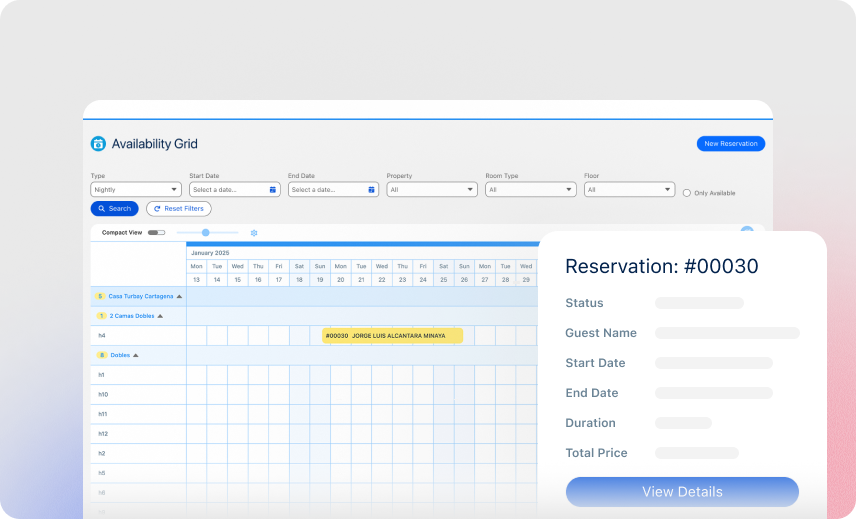
Check the details, find an available date, and extend a guest's stay with a simple drag-and-drop move.

Keep rooms, spaces, units, and other bookable resources accurate so customers and staff can see what is actually available.
Core is Booking Engine + Reservation System for $400/month. Availability Management is already part of that package.
The Booking Engine needs to know what can be sold. Reservation Management needs to know what remains open. Availability Management keeps those two sides connected.
See how staff can check availability, create or move reservations, extend stays, and take rooms out of order from the Availability Grid.
Check the details, find an available date, and extend a guest's stay with a simple drag-and-drop move.
See what is available, create a reservation, and switch to an hourly view for a closer look at the schedule.
Move a booked stay to another room and mark a room Out of Order when it needs attention.
Booking Ninjas is publicly listed on Salesforce AppExchange. Salesforce requires security review for applicable AppExchange package types before listing.
Keep availability connected to the reservations and rules that actually change it.
Give customers and staff a clearer view of what can be booked based on the latest reservation data.
Use shared availability and configured rules instead of separate calendars and manual checks.
When a reservation changes or is canceled, the availability workflow can update accordingly.
Make rooms, spaces, units, and resources easier to sell by keeping their status visible and connected.
Control what can be booked, when it can be booked, and who can override the normal rules.
Set capacity or allocation limits for the inventory or resource being booked.
Block dates or periods that should not be offered for booking.
Set advance notice, cutoffs, minimum stays, or other timing rules where required.
Allow authorized staff to make exceptions while keeping the change visible in the operating record.
Keep the availability view tied to the same reservation workflow instead of reconciling separate systems by hand.
See these workflows in the product videos ↑A reservation can reduce the available capacity or inventory according to the configured booking logic.
Date, unit, quantity, or resource changes can feed back into availability based on the configured workflow.
Released capacity can become available again when the cancellation workflow allows it.
Use it anywhere customers or staff need an accurate view of rooms, spaces, units, or other bookable capacity.
Availability Management is included in the $400/month Core Package with the Booking Engine and Reservation System.
Core Package
There is no separate Availability Management subscription on top of Core.
One-time implementation
Implementation depends on your inventory structure, availability rules, data, integrations, testing, training, and rollout.
Supported built-in integrations are included platform capabilities. Third-party licenses, payment processing, messaging, premium AI, new integrations, and custom development can be separate where required.
See how Booking Ninjas Core compares with manual availability tracking and standalone tools.
| Capability | Manual / Basic | Booking Ninjas | Standalone Tool |
|---|---|---|---|
| Availability view | Separate calendars | Connected to reservations | Usually supported |
| Booking changes | Manual updates | Connected workflow | Usually supported |
| Capacity rules | Manual checks | Configurable rules | Usually supported |
| Blackouts & cutoffs | Manual tracking | Configurable rules | Usually supported |
| Reservation context | Separate records | Included in Core | Depends on product |
| Salesforce context | No native connection | Salesforce-native | Requires integration |
| Reporting | Manual consolidation | Core reports & dashboards | Product-specific |
| Best fit | Simple availability needs | Availability + Salesforce operations | Standalone scheduling workflow |

Connect availability, reservations, booking rules, capacity, and reporting inside Booking Ninjas Core.
WhatsApp Us
WhatsApp Us