
Invoice Management on Salesforce
Create, track, and manage invoices alongside the bookings, customers, payments, and operational records that produced them.
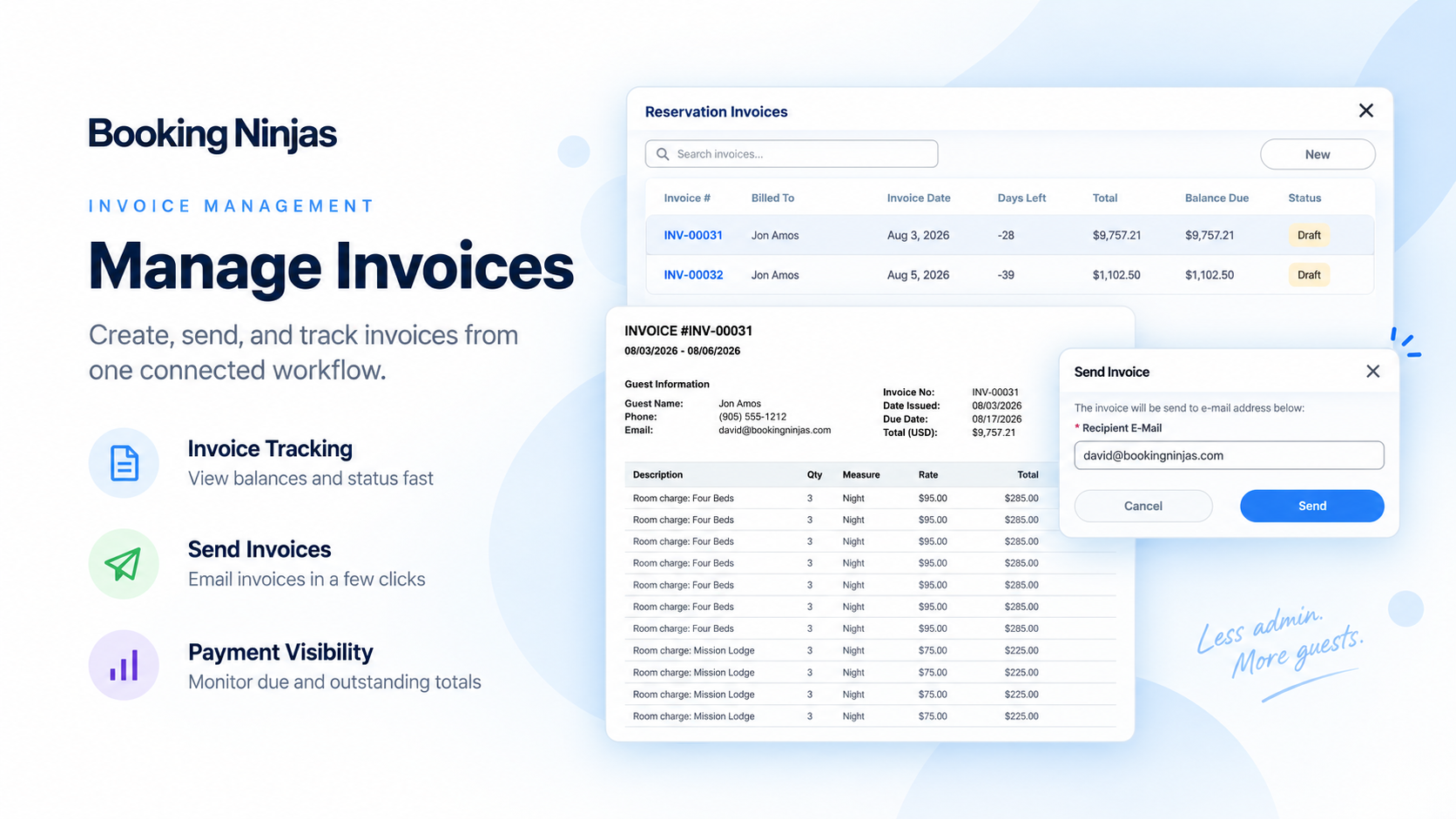
Invoicing & Billing Are Already Part of Core
Core is Booking Engine + Reservation System for $400/month.
Core / Month
No separate Invoice Management subscription is added on top.
Connected Billing Record
Keep invoices tied to the customer, reservation, service, or operating workflow that created them.
Billing Foundation
Use invoicing with reservations, rates, recurring billing, payments, and reporting.
Watch Invoice Management in Action
Show how an invoice is created, updated, paid, and tracked inside the same Booking Ninjas workflow.
Create the Invoice
Show how booking, service, rate, or billing details become an invoice inside Core.
Track Payment & Balance
Show invoice status, partial payments, outstanding balance, and related payment context.
Review Billing Activity
Show open, paid, overdue, or aging invoices through the reporting configured for the operation.

Verified in the Salesforce Ecosystem.
Booking Ninjas is publicly listed on Salesforce AppExchange, giving buyers an external place to review the product and its public pricing reference.
Create Invoices From the Work Already in the System
Keep invoice creation tied to the booking, service, rate, or billing activity that produced the charge.

Invoice Generation
Create invoices from configured booking, service, or billing workflows instead of rebuilding the charge manually.
Rates, Fees & Taxes
Use configured pricing, fees, and tax logic when the implementation requires them.
Recurring Billing
Support recurring invoice and billing schedules for memberships, services, or other repeat charges where configured.
Invoice Delivery
Use standard transactional communication to send invoice-related messages through the configured workflow.
Add Approval Control Where It Matters
Use Salesforce workflow and permissions when selected invoices need review before they are finalized or issued.
Approval Thresholds
Use configured thresholds when higher-value invoices need additional review.
Assigned Approvers
Route selected invoices to the right manager, finance user, or approval group where required.
Workflow Rules
Apply approval logic based on the business process, department, amount, or other configured conditions.
Decision History
Keep approval status and related user actions visible in the Salesforce record where configured.
Keep Payment Status Connected to the Invoice
Make it easier to see what has been billed, what has been paid, and what is still outstanding.

Payment Matching
Connect supported payment activity to the related invoice so staff can see the payment context in one place.

Partial Payments
Track partial payments and the remaining balance against the invoice when the workflow supports installments or deposits.
Outstanding Balance
Keep the unpaid amount visible for staff and downstream reporting.
Accounting Handoff
Use supported integrations or implementation-specific exports when invoice data needs to move into an accounting workflow.
See What Is Open, Paid, and Overdue
Use the invoice data captured in Booking Ninjas for billing and receivables reporting.
- Open and paid invoice reporting
- Outstanding balance visibility
- Aging views or reports where configured
- Customer or account billing history
- Department or business-unit reporting where the data model supports it
- Overdue reminders or alerts where configured
Support More Than One Billing Pattern
Use Core for the billing structures that commonly sit around bookings, memberships, services, and repeat charges.
- Group Billing
- Multi-Line Invoices
- Deposits and Partial Payments
- Recurring Billing
- Installment Schedules
- Membership Billing
- Service Charges
- Bundled Charges
Keep Invoices Connected to Salesforce Operations
Booking Ninjas is Salesforce-native, so billing can stay closer to the customer and operational records that created it.
Customer Context
Keep invoice records connected to the relevant customer, guest, member, or account.
Reservation Context
Keep invoices tied to the reservation, service, group booking, or other workflow that produced the charge.
Payment Context
Surface payment status and outstanding balances according to the configured payment workflow.
Shared Reporting
Let operations and finance work from the same underlying billing records and Salesforce data.
Invoice Management Pricing
Invoicing and Billing are included in the $400/month Core Package.
Core Package
Booking Engine + Reservation System
Per Month
Core pricing for the Booking Engine + Reservation System.
Invoicing & Billing
No separate Invoice Management subscription is added on top of Core.
Implementation
One-time implementation is discussed based on scope.
Implementation depends on billing rules, invoice layout, payment flow, tax setup, recurring billing, approvals, data, integrations, testing, training, and rollout. Payment processor, transaction, accounting-vendor, premium AI, new-integration, and custom-development costs can be separate where required. Learn why implementation is discussed before a final price .
Invoice Management: Booking Ninjas vs Other Approaches
Compare spreadsheet or standalone invoicing with billing that stays connected to Booking Ninjas operations.
| Capability | Spreadsheet / Manual | Booking Ninjas | Standalone Invoicing Tool |
|---|---|---|---|
| Invoice creation | Manual entry | Connected to Core workflow | Usually supported |
| Reservation context | Separate records | Connected to reservations | Requires integration |
| Recurring billing | Manual schedule | Supported in Core | Depends on product |
| Partial payments | Manual tracking | Connected balance view | Usually supported |
| Approval workflow | Email / manual | Configurable in Salesforce | Depends on product |
| Salesforce context | No native connection | Salesforce-native | Requires integration |
| Separate invoice fee | Not applicable | No — included in Core | Vendor pricing varies |
| Best fit | Very simple billing | Billing + booking operations | Standalone accounting workflow |
Frequently Asked Questions
Keep Billing Connected to the Booking
Use Core to connect invoices, recurring billing, payment status, customer records, reservations, approvals, and reporting in Salesforce.