
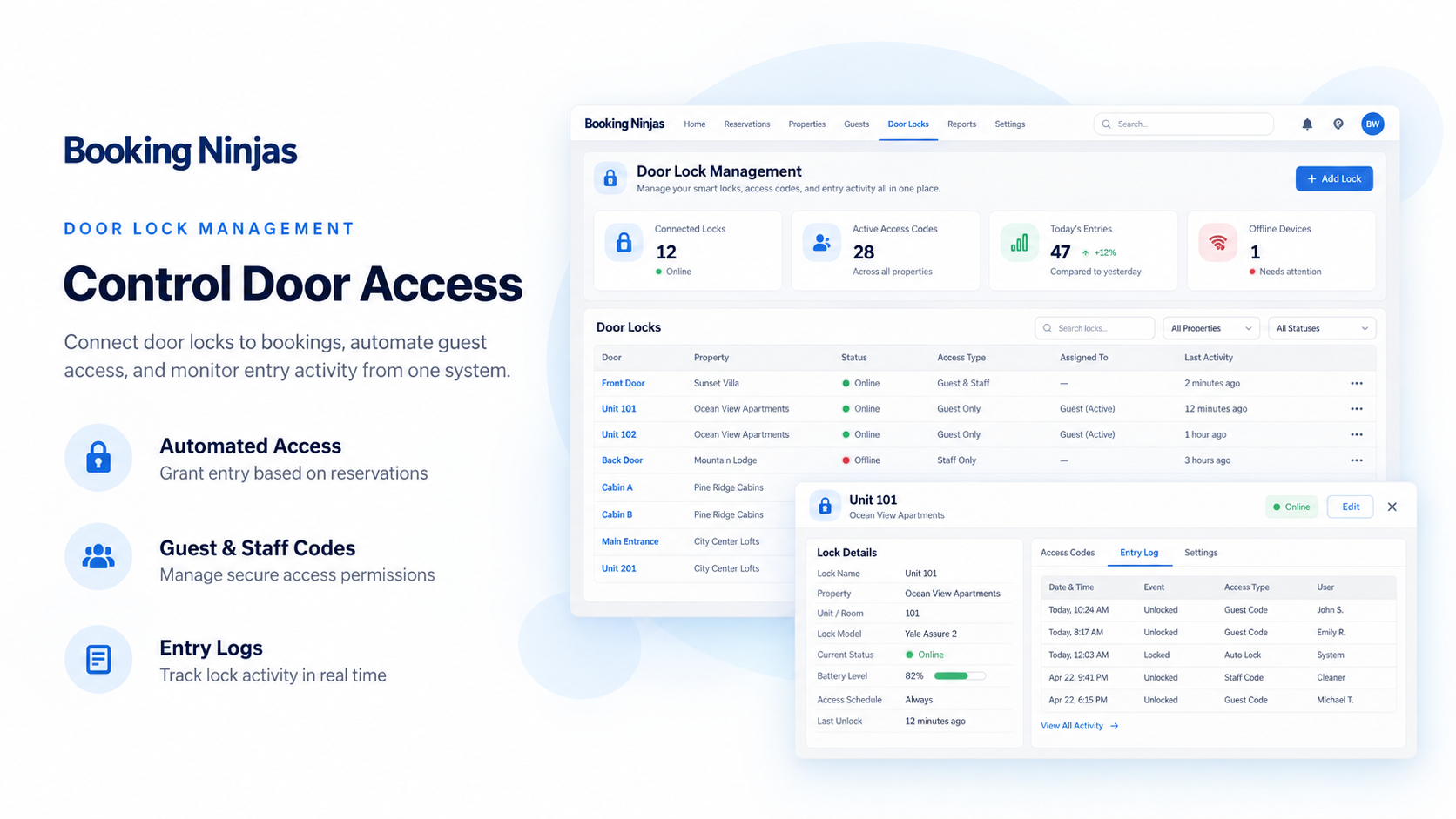
Door Lock Management Connected to Booking Operations
Connect supported door-lock and access workflows to the Booking Ninjas records your team already uses for guests, stays, bookings, check-in, and day-to-day operations.
Door Lock Management Is Priced Per Door
$7.50/month per managed door
Per Door / Month
Pricing scales with the number of doors managed through the configured lock workflow.
BN Minimum Subscription
Booking Ninjas' minimum subscription remains $400/month.
Hardware & Vendor Costs
Locks, gateways, installation, and third-party access-control fees remain separate where applicable.
Watch the Door Lock Workflow in Action
Show how the booking or stay connects to the access rule, credential, and staff-side door workflow.
Configure the Door
Show a supported door or lock being connected to the location, unit, room, or access point used by staff.
Assign Guest Access
Show how access can be connected to a guest, reservation, stay, or other configured operational record.
Manage From the Staff Workflow
Show door assignments, access status, and staff actions supported by the configured lock provider.

Verified in the Salesforce Ecosystem.
Booking Ninjas is publicly listed on Salesforce AppExchange, giving buyers an external place to review the product and its public pricing reference.
Connect Door Access to the Operational Record
Use the lock integration as part of the booking, stay, member, tenant, or facility workflow instead of managing access in isolation.
Door Assignment
Associate supported doors or access points with the units, rooms, spaces, or locations used by the operation.
Guest or User Context
Keep access tied to the person and the Booking Ninjas record that explains why access is being provided.
Access Window
Use start and end times or other access rules where the supported lock provider and implementation allow it.
Access History
Keep the relevant lock or access information available to staff where the configured provider returns it.
Use Access Where It Fits the Guest or Occupant Journey
Door Lock Management can support access steps around arrival, occupancy, departure, and staff follow-up when the workflow is configured for them.

Before Arrival
Prepare the supported access workflow after the reservation, room, guest, and arrival details are ready.

During the Stay or Access Period
Keep staff access management connected to the active stay, booking, member, tenant, or other configured user context.
After Departure or Expiry
Use the configured end-of-access workflow so door permissions can follow the stay or access period where supported.
The Lock Provider Still Controls the Physical Access Layer
Booking Ninjas connects the operational workflow. Physical access depends on the lock hardware, provider, gateway, network, and supported API.
-
Supported Lock Integration
Existing supported provider connections can be configured as part of implementation.
-
Hardware & Installation
Physical locks, gateways, installation, locksmith work, and related hardware costs remain separate.
-
Vendor Subscription
Third-party lock, access-control, gateway, or cloud-service fees remain separate where applicable.
-
New Integration
If the required lock provider is not already supported, the integration can require separate scoping.
Where Door Lock Management Fits
Useful when physical access needs to stay connected to a reservation, occupant, member, space, or operational record.
Hotels & Guest Stays
Connect room access to reservation, guest, check-in, and stay records where supported.
Vacation & Corporate Rentals
Use supported digital-access workflows around arrival, occupancy, and departure.
Coworking & Membership Spaces
Connect access to member, space, booking, or other eligibility rules where the implementation supports them.
Student & Residential Operations
Use supported access-control workflows around occupants, rooms, common areas, and other managed doors.
Door Lock Management Adds the Access Layer
Other Booking Ninjas modules continue to own the reservation, membership, portal, billing, or event workflow behind the access rule.
- Door & Access Workflow — Door Lock Management
- Bookings, Guests, Availability & Check-In/Out — Core
- Member Records & Benefits — Membership
- External Self-Service — Portal Extension
- Classes & Attendance — Class App
- Events & BEO — Event Management
- New Lock Integrations or Client-Specific Access Logic — Scoped Separately
Door Lock Management Pricing
$7.50/month per managed door.
Door Lock Management Extension
Connect supported door-access workflows to Booking Ninjas operations
Per Door / Month
Monthly Booking Ninjas pricing for each managed door included in the setup.
Doors = $75 / Month
Example: 10 managed doors × $7.50 = $75/month for the Door Lock extension.
Implementation
Provider setup, mapping, access rules, testing, permissions, and rollout depend on scope.
Minimum Subscription
Booking Ninjas starts at $400/month. Door Lock Management is added at $7.50/month per managed door.
Separate When Needed
Lock hardware, gateways, installation, vendor subscriptions, new integrations, and client-specific access logic may be priced separately. Learn why →
Door Lock Management: Booking Ninjas vs Other Approaches
Compare isolated lock administration with an access workflow connected to Booking Ninjas operations.
| Capability | Manual / Separate Lock App | Booking Ninjas | Standalone Access Platform |
|---|---|---|---|
| Door management | Separate system | Connected extension | Core capability |
| Booking / stay context | Manual lookup | Can connect to Core | Requires integration |
| Access windows | Manual configuration | Provider-dependent workflow | Usually supported |
| Guest / user context | Separate records | Connected to BN records | Requires integration |
| Hardware compatibility | Vendor-specific | Supported providers only | Vendor-specific |
| Salesforce context | No native connection | Salesforce-native | Requires integration |
| BN extension pricing | Not applicable | $7.50 per door/month | Vendor pricing varies |
| Best fit | Very light access needs | Access + BN operations | Standalone access control |
Frequently Asked Questions
Connect Door Access to the Operations Behind It
Use Door Lock Management to connect supported access workflows with the guests, bookings, stays, members, spaces, and staff processes managed in Booking Ninjas.